World Refugee Day Flyer: A Practical Design Asset for Humanitarian Communication
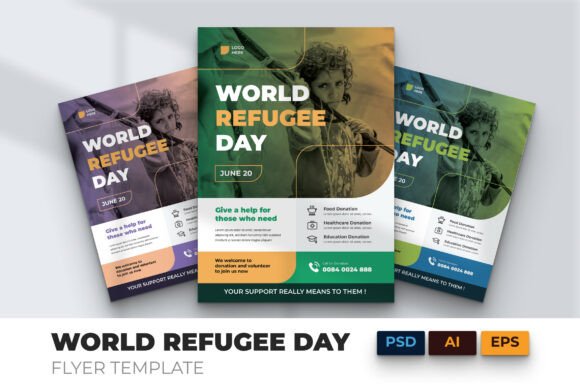
When planning a World Refugee Day campaign—whether for an NGO, school, faith-based group, or community coalition—the World Refugee Day Flyer serves as a grounded starting point, not just a visual placeholder. It’s designed to slot directly into real-world workflows where clarity, speed, and emotional resonance matter equally. Unlike generic templates that require heavy reworking, this flyer arrives production-ready: high-resolution, print-optimized, and structured for fast customization without sacrificing impact.
Where It Fits in Your Campaign Workflow
The World Refugee Day Flyer isn’t meant to sit unused in a downloads folder. It becomes active early—in the planning phase—when teams are aligning messaging, defining audience touchpoints, and assigning design responsibilities. Because it supports both digital and print use cases (social posts, email headers, event posters, printed handouts), you can build one core asset and adapt it across channels—not recreate from scratch each time. That saves 3–5 hours per campaign cycle, especially when coordinating with volunteers or part-time designers.
For educators preparing classroom activities, the clean infographic-style sections make it easy to isolate statistics or quotes for discussion prompts. For marketers managing multiple campaigns, having a pre-vetted, CMYK-ready A4 layout means no last-minute color corrections before print runs. And for freelancers supporting nonprofit clients, the well-organized layers and editable text fields let you deliver polished drafts in under two hours—even with minimal brand assets on hand.
How It Integrates With Other Tools and Resources
This flyer works best when treated as a node—not an endpoint—in your communication ecosystem. Its editable AI, PSD, EPS, and Affinity Designer files integrate cleanly with standard creative tools. You can pull vector elements into Canva for quick social variants, extract typography treatments for email templates, or repurpose the photo layout structure for Instagram carousels. Since it uses only free, widely available fonts, there’s no licensing friction when sharing files across teams or handing off to external partners.
It also complements content planning tools. If you’re using Notion or Trello to manage campaign timelines, attach the Help Guide File alongside your brief—it clarifies layer naming, bleed settings, and image replacement steps so contributors don’t waste time reverse-engineering the file. When paired with stock photo platforms like Unsplash or Pexels, the “image stock not included” note becomes an advantage: you choose visuals that reflect your specific region, demographic focus, or storytelling angle—no generic filler.
Practical Implementation Tips for Real Projects
Start with purpose, not pixels. Before opening the AI file, define your primary action goal: Is this flyer driving event attendance? Soliciting donations? Raising awareness among local policymakers? That decision determines which section to emphasize—donation CTA, QR-linked petition, or speaker lineup—and how much space to allocate to data vs. narrative.
Leverage the bleed and layer organization deliberately. The 3mm bleed ensures professional printing, but it also signals that margins matter. Keep critical text and logos inside the safe zone. Use layer groups (e.g., “Infographic Elements,” “Photo Mask,” “Typography”) to mute or swap components without disrupting layout integrity. If your team includes non-designers, rename layers clearly—“Donation Button – Editable Text” instead of “Layer 7”—before sharing.
Test compatibility early. While the template supports major formats, verify how fonts render in your version of Illustrator or Affinity. Some free fonts behave differently across OS versions. Open the Help Guide File first—it lists tested font names and fallback options. If you need to substitute a typeface, choose one with similar x-height and weight contrast to preserve hierarchy.
Using It Across Project Phases
Before launch: Use the flyer as a visual anchor during stakeholder reviews. Print a draft and mark up copy edits by hand—or share a PDF version with clear annotation permissions. Its strong typography makes feedback faster: people notice inconsistent messaging or weak calls-to-action immediately.
During execution: Repurpose sections modularly. Pull the “Refugee by the Numbers” graphic into a presentation deck. Export the headline treatment as SVG for website banners. Convert the donation section into a standalone WhatsApp-friendly image for peer-to-peer outreach. Because everything is editable—not flattened—you retain flexibility without losing fidelity.
After the event: Archive the final file with version notes (“June2024_WRD_Flyer_Final_Print”). That builds institutional memory. Next year, you’ll spend less time sourcing templates and more time refining messaging—updating stats, swapping photos, or localizing language. Consistency across years strengthens recognition; small evolutions signal responsiveness.
Factors That Affect Long-Term Usability
Quality control starts with preparation. The World Refugee Day Flyer includes a Help Guide File—not as an afterthought, but as a workflow safeguard. It walks through resolution checks, color mode verification, and safe-zone guidelines. Skipping this step risks misprints or pixelated web exports, especially if collaborators aren’t print-savvy.
Organization matters beyond aesthetics. Layer naming conventions, grouped elements, and locked background assets reduce accidental edits. That’s crucial when multiple people contribute—say, a volunteer adds translated text while a designer adjusts spacing. Fully customizable doesn’t mean “unstructured.” It means intentional structure that invites collaboration, not confusion.
Efficiency compounds over time. Once you’ve used the template for three campaigns, you’ll recognize patterns: which sections get edited most often, where stakeholders consistently request changes, and how long localization takes. Document those observations. They turn a one-off design asset into a repeatable process—one that scales with your mission, not against it.
Real-World Integration Examples
- A university communications team used the flyer as the base for their annual World Refugee Day lecture series. They replaced the central photo with portraits of refugee students on campus, added QR codes linking to student testimonials, and exported the A4 version for print and a cropped 1080x1350 version for Instagram Stories—all within one afternoon.
- A small-town bookstore hosting a refugee author reading adapted the “Event Details” section into a window poster, then reused the headline font and color palette across their email newsletter and website banner—creating visual continuity without hiring a designer.
- An education nonprofit training teachers extracted the infographic layout to build a simplified handout for middle-schoolers, keeping the same data points but simplifying language and adding discussion questions in the margin space.
The World Refugee Day Flyer succeeds not because it’s visually striking alone—but because its construction respects how people actually work: under deadlines, across tools, with mixed skill levels, and toward tangible outcomes. It assumes you care about refugees, yes—but also that you value your time, your team’s bandwidth, and the integrity of your message. That balance is rare. When you choose this template, you’re choosing a tool built for doing, not just displaying.