Company Overview PowerPoint: A Practical Tool for Clear Business Communication
Whether you're pitching to investors, briefing your leadership team, or introducing a startup to potential clients, how you present your company matters—deeply. The Company Overview PowerPoint is more than just another slide deck template. It’s a thoughtfully structured, ready-to-use presentation framework designed to help professionals communicate their organization’s identity, strategy, and value with clarity and confidence.
What Is the Company Overview PowerPoint—and Why Does It Stand Out?
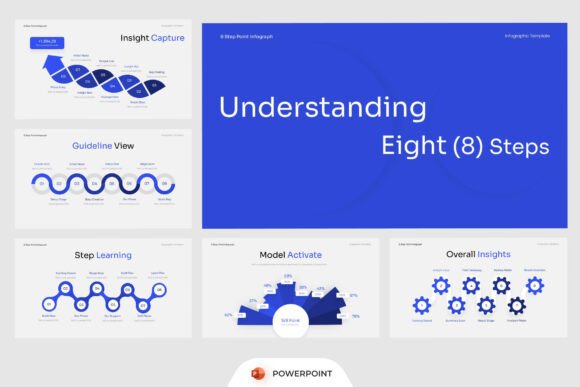
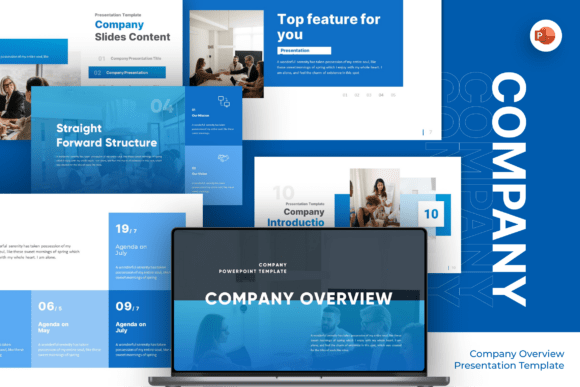
The Company Overview PowerPoint is a professionally crafted business presentation template built specifically for corporate storytelling. Unlike generic slide decks, it anticipates real-world presentation needs: from explaining service offerings and team structure to visualizing growth timelines and financial highlights. Its clean, structured blue layouts convey professionalism without sacrificing flexibility—making it ideal for both seasoned presenters and those new to formal business communication.
At its core, this template bridges design and function. Every section—from agenda timelines to pricing tables—is purpose-built. That means less time wrestling with formatting and more time focusing on your message. It’s not about flashy animations or over-designed graphics; it’s about supporting substance with smart, intuitive structure.
Key Features That Make It Work in Practice
What sets the Company Overview PowerPoint apart isn’t just aesthetics—it’s usability grounded in real workflow needs. Here’s what users consistently find valuable:
- Fully editable slides—no locked layers or hidden elements. Change text, swap icons, adjust colors, or reorganize sections in minutes.
- 16:9 widescreen ratio—optimized for modern projectors, laptops, and virtual meeting platforms like Zoom or Teams.
- Free fonts included—no licensing surprises or missing typefaces when opening the file on another device.
- Comprehensive package—includes PowerPoint (.pptx) files plus a clear Help Guide to walk through customization steps.
- No stock image dependencies—all placeholder images are clearly marked, so you can easily replace them with your own brand assets.
Importantly, “easy to use” doesn’t mean “limited in scope.” Each slide is built to serve a distinct communication goal—whether that’s mapping out a quarterly roadmap, comparing service tiers, or illustrating market positioning through infographics.
Who Benefits Most From This Template?
The Company Overview PowerPoint shines across diverse professional contexts. Consider these real-world applications:
- Consulting firms use it to frame client discovery sessions—structuring introductions, scope definitions, and expected outcomes in one cohesive flow.
- Legal practices adapt the team overview and service sections to clarify expertise areas and case-handling processes—especially helpful during initial consultations.
- Finance and investment teams rely on its analytics-ready layouts to visualize KPIs, revenue trends, and portfolio performance—without needing custom chart builds each time.
- Startups leverage the agenda timeline and mission/vision slides to align internal teams before investor meetings—or to onboard new hires with consistent messaging.
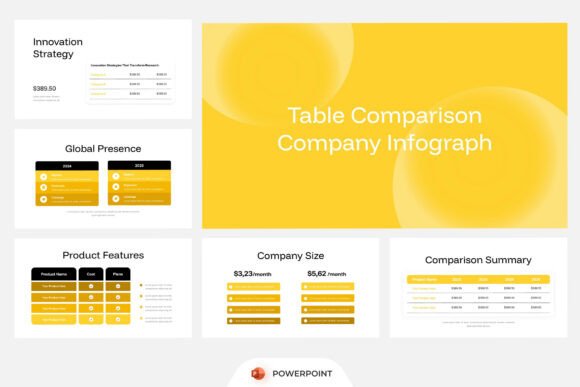
- Marketing agencies repurpose the service overview and pricing table slides to compare package options transparently, reducing back-and-forth emails.
It’s equally useful for solo professionals—freelancers, coaches, and independent consultants—who need to present credibility quickly, without investing hours into slide design.
Strengths Beyond the Surface
One of the quiet strengths of the Company Overview PowerPoint is its consistency—not rigid uniformity, but thoughtful repetition of visual cues (like color-coded sections or aligned icon styles) that help audiences follow along effortlessly. This supports cognitive load theory: people absorb information better when layout patterns reinforce meaning rather than distract from it.
Another strength is its adaptability across formats. While designed for live presentations, the same slides translate well into PDF handouts, pitch decks for email outreach, or even static web pages for “About Us” sections—thanks to its modular, content-first structure.
Realistic Expectations: What It Doesn’t Do (and Why That’s Okay)
It’s important to be transparent: the Company Overview PowerPoint does not include licensed stock photos, video embeds, or animated transitions. It also doesn’t auto-generate charts from Excel data or sync with live dashboards. These aren’t oversights—they’re intentional boundaries.
By excluding external dependencies, the template ensures reliability across devices and versions of PowerPoint. You won’t hit a “missing font” error mid-presentation or discover an image link has broken. And because all visuals are placeholders—not embedded assets—you retain full control over branding, tone, and relevance.
This also means the template respects your time and resources. You decide which images to license (or shoot), which data to pull from your CRM or analytics tools, and how much animation—if any—supports your delivery style.
How to Evaluate If It Fits Your Needs
Before downloading or purchasing, ask yourself three practical questions:
- Do I need structure—not just slides? If your current presentations feel scattered, repetitive, or inconsistent across team members, this template provides a shared language for clarity.
- Am I balancing speed with professionalism? If you regularly build presentations under tight deadlines but still need to reflect credibility and attention to detail, the pre-built layouts save hours while raising perceived quality.
- Do I want flexibility—not rigidity? Because every slide is fully editable and logically grouped (e.g., “Team,” “Services,” “Analytics”), you can use only the sections you need—and reorder them freely.
If two or more answers resonate, the Company Overview PowerPoint is likely a strong fit—even if you’ve never used a template before.
Making the Most of It: A Quick Customization Tip
Start small. Pick one section—say, the “Our Services” infographic slide—and customize just that. Replace the placeholder text with your actual offerings, swap the icons for ones that match your industry (free icon libraries like Flaticon or Noun Project work well), and adjust the color to align with your logo. That single, polished slide becomes your anchor point—building confidence to tackle the rest at your own pace.
Remember: templates don’t replace your expertise. They amplify it. The Company Overview PowerPoint gives you space to focus on what truly matters—your story, your strategy, and the people you’re speaking to.
Final Thought: Clarity Starts With Intentional Design
In a world saturated with information, being understood is a competitive advantage. The Company Overview PowerPoint doesn’t promise magic—it offers something more reliable: intentionality. Every layout choice, every section label, every typographic decision serves a communicative purpose. And when your presentation reflects that level of care, your audience feels it—even if they can’t name why.
Whether you’re preparing for your next board meeting, refining your startup’s pitch, or updating your firm’s annual review, this template meets you where you are: not as a designer, but as a communicator who values impact over ornamentation.