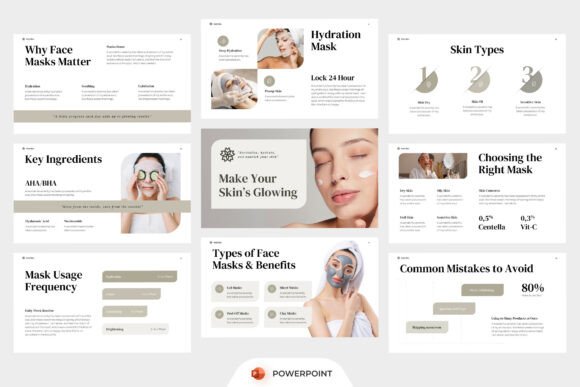
Skincare Product PowerPoint: A Practical Guide for Beauty Professionals and Creators
If you're launching a new serum line, educating clients on ingredient science, or pitching a wellness campaign to investors, your presentation needs to reflect the same care and clarity your products embody. That’s where Skincare Product PowerPoint comes in—not as a generic deck, but as a purpose-built beauty presentation template designed for credibility, elegance, and ease.
It’s not just about pretty slides. This template offers editorial-style layouts that mirror high-end skincare magazines—think clean typography, intentional whitespace, and soft neutral palettes that let product imagery and messaging breathe. With dedicated sections for routines, ingredient spotlights, clinical benefits, and comparative infographics, it supports storytelling that resonates with both dermatologists and first-time buyers.
Common Missteps—and Why They Cost You Time, Trust, or Impact
Many users download Skincare Product PowerPoint expecting plug-and-play perfection—only to hit roadblocks they didn’t anticipate. Here’s what often goes wrong—and how to sidestep it:
Mistake #1: Assuming “Editable” Means “No Setup Required”
Yes, every slide is fully editable—but that doesn’t mean fonts, colors, or image placeholders auto-adjust to your brand. The included free font works beautifully *if* you install it first. Skipping this step leads to inconsistent text rendering, especially when sharing files across devices or with collaborators using different OS versions.
Better approach: Before editing, open the Help Guide file (included in the package) and follow the two-minute font installation steps. Then, use the built-in color palette swatches—not random hex codes—to maintain visual harmony across slides.
Mistake #2: Overlooking the 16:9 Ratio’s Real-World Implications
The widescreen format is ideal for modern displays—but problematic if you plan to present in older conference rooms or export to PDF for printed handouts. Stretching content to fit non-widescreen screens can crop key visuals or blur fine typography, especially in ingredient callout slides.
Better approach: Test your final deck on at least two display types before presenting. For hybrid events (in-person + virtual), duplicate critical slides into a separate 4:3 version—just resize elements proportionally rather than stretching. Keep text size above 24pt for body copy and 36pt for headers to ensure legibility at distance.
Mistake #3: Treating Stock Image Placeholders as Final Assets
The template includes smart image frames and layout guides—but no actual photos. Some users rush to drop in low-res Instagram screenshots or watermarked stock images, undermining the luxury aesthetic the design was built to support.
Better approach: Reserve time (even 30 minutes) to source high-quality, consistent visuals. Look for cohesive sets—e.g., flat-lay shots of serums against marble, or macro textures of botanical extracts—not isolated product photos. Use tools like Unsplash or Pexels with filters for “commercial use” and “no attribution required.” When in doubt, opt for subtle gradients or textured neutrals over busy backgrounds.
What to Verify Before You Customize—or Share
Before investing hours into tailoring Skincare Product PowerPoint, pause and check three practical things:
- Your audience’s context: Are they clinicians who need clinical trial data points? Consumers seeking simple routine guidance? Influencers needing swipe-friendly takeaways? Adjust slide depth accordingly—don’t overload a 5-slide social pitch with pH stability charts.
- Your technical environment: Confirm whether your team uses Microsoft PowerPoint, Google Slides (via import), or Apple Keynote. While .pptx files are widely compatible, animations and master slide behaviors may shift slightly. Stick to basic transitions unless you’ve tested them end-to-end.
- Your brand alignment: Does the template’s soft neutral tone match your voice? A bold, vibrant brand (e.g., a vitamin C-focused startup) may need deeper accent colors added to the palette—but do so deliberately, using the existing grayscale base as anchor. Avoid swapping all neutrals for brights; it fractures cohesion.
Real Examples: From Generic to Purposeful
Consider a skincare educator preparing a workshop on barrier repair. One creator used Skincare Product PowerPoint’s “Ingredient Highlight” slide to list ceramides, cholesterol, and fatty acids—but buried them in bullet points with no visual hierarchy. Attendees remembered little beyond “lots of science words.”
A better version used the same slide: a central circular diagram showing how each component interacts, minimal labels, and one short sentence beneath (“Together, they rebuild lipid integrity—like mortar between brick-like skin cells”). That version sparked more questions, longer engagement, and post-event downloads of the handout PDF.
Or take a small-batch facial oil brand launching online. Instead of cramming 12 product benefits onto one “Product Benefit” slide, the founder split them across three themed slides: “For Sensitive Skin,” “For Dull Complexions,” and “For Night Recovery”—each with a single icon, one headline phrase, and a 12-word proof point (“Dermatologist-tested, non-comedogenic, absorbs in under 90 seconds”). Conversion on their follow-up email rose by 27%.
Final Thought: Design Is Part of Your Skincare Story
Your presentation isn’t separate from your product—it’s the first touchpoint where people decide whether your science, your values, and your results feel trustworthy. Skincare Product PowerPoint gives you structure, but its effectiveness depends on how thoughtfully you fill it. Prioritize clarity over decoration, consistency over variety, and audience insight over aesthetic assumptions.
You don’t need flashy animations or endless slides. You need one well-paced narrative—backed by credible visuals, grounded in real usage, and respectful of your audience’s time and intelligence. That’s how a beauty presentation becomes more than a deck. It becomes a conversation starter. A trust builder. A quiet signal that says, “We understand skin—and we respect you.”